

Plugin Remover

If you ever load up an old scene, perhaps one created years previously, you sometimes get a message about missing plugins, with a list of IDs of plugins used in that scene which are no longer available and have not been loaded. Sometimes, this has no effect on the scene and you can ignore the message - though it would be nice to get rid of it because you see it every time you open the file. If the plugin was important to the scene, you will have to either get hold of the plugin for your version of C4D (if it is available) or substitute it for another. The problem is, even with a substitute you might still be stuck with the annoying message.
If you intend to give the scene to someone else, it looks very poor to distribute it with that message showing every time they load it, but it isn't always easy to fix. In order to do so, you first have to find the object/tag/shader/whatever in the scene. However, since the plugin hasn't been loaded, there is no interface and all you are left with is the name. And of course, an object might have been renamed so you can't even search for the name. Worse, you might not even know what sort of plugin it was, if it was a long time ago or this is someone else's file and you never used the plugin.
It is possible to search the scene for instances of the missing plugin and remove them manually, but in a large scene this is very tedious and it's easy to miss one or more. What is needed is a way to do it automatically.
What this plugin does
Missing Plugin Remover (MPR) does three things if you get the missing plugins message:
- attempts to identify what type of plugin the missing one is
- will list all the instances of the plugin in the scene
- can remove all the instances of the missing plugin, thereby removing the missing plugin message
MPR can list and/or remove the four commonest plugin types - objects, tags, shaders and videoposts (post-effects).
Interface
The interface looks like this:
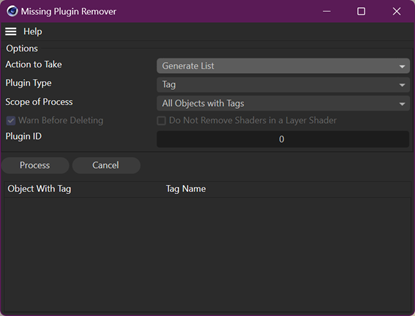
The plugin comes with a comprehensive manual for its use, but it's very simple to use.
Availability
The plugin is free to download and use, and you can download a copy from the links below.
Compatibility
The Missing Plugin Remover is compatible with the following versions of Cinema 4D:
| Cinema 4D version | Compatible? |
|---|---|
| R2025 | Yes (macOS version requires C4D 2025.2 or later) |
| R2026, R2027 | Yes |
Note - there are separate downloads for each compatible version of C4D listed in the above table - make sure you download the correct file!
There are no versions for C4D R2024 or earlier.
Download
 Download Plugin Remover for R2025
Download Plugin Remover for R2026 or R2027
Page last updated October 15th 2026