

Creating PBR materials

It must be clear to most users of this site that I like shader programming: there are eight shader plugins for download here and I have two more in development. But it isn't just shaders; the whole area of material creation I find fascinating. So how do we go about creating a new texture to load into our DCC of choice? Nowadays, a realistic material really means a PBR (physically-based rendering) material. This requires the generation of several maps, such as base colour, ambient occlusion, height, metallicity, roughness, normal and so on.
Creating bitmaps...
The traditional way of doing this would be through the creation of a series of bitmaps in a digital paint program. Doing so from scratch is time-consuming and probably would never look quite right, so the starting point for these bitmaps is usually a set of high-quality digital images of the surface to be recreated. This can then be manipulated into producing the various bitmaps required. The problem with this is that to tweak anything in the final result means going back to the paint app and changing one or more of those bitmaps.
Unfortunately I don't have the equipment, photographic ability, or to be honest the skill in digital painting to take such images and make them into a material. Which is why I prefer to code shaders, this being the other way to develop materials: as long as the shader will work in the different channels required, the result can be quite good, though it's unlikely to approach the realism of an actual surface from nature. Coding a shader to produce a highly realistic tree bark, for example, would be quite a task compared to taking images of a tree and generating bitmaps from those, and it would be necessary to code a new shader for every desired PBR material. No-one is going to do that.
...versus procedural materials
The main problem with bitmaps though is that while they can produce excellent results, once the user has those bitmaps the material is pretty much fixed. Things such as colour and displacement can maybe be tweaked a little in the main DCC app being used but they will be just tweaks. However, there is a third way. What if an app could produce a material without bitmaps (i.e. procedurally, like a shader) but being procedural, easy to change, perhaps radically. There are such apps and they all use a node-based process to produce a result, so no painting skills are needed (a definite bonus in my case). Quite a number of apps can do this to some extent or other, but there are four which are the standouts. They are:
There is one other thing that would be nice. What if the DCC which is to use the material didn't require bitmaps to be exported from the material creator but could import and use the native file format the creator app used? That way, it might also be possible to change the parameters of the material inside the DCC app itself, rather than having to go back to the material creator to do it. This is almost like creating 'procedural bitmaps' if there were such things. So, which of the above fulfils these requirements?
All of the above apps use a node-based approach to material generation; all produce what seem to be excellent materials; all have extensive libraries of pre-made assets to download. Three are free to use (well, almost) and one is expensive. Which one to choose?
Choosing an app
I'm going to rule out Material Maker and ArmorPaint. These look to be fine apps but only output bitmaps, so to use them you have to create a material in the DCC app, then manually load the bitmaps into that. Also, once those maps are loaded and you find that you'd like to tweak the colour a little or some other aspect, you have to go back to the material creator to do it. Not a big deal and for many people those are minor inconveniences, but that's not what I'm looking for.
That leaves Substance 3D and Instamat. Here are a couple of examples. These are both fabric materials downloaded from their respective websites. On the left is a Substance material, on the right Instamat, both rendered in Redshift:
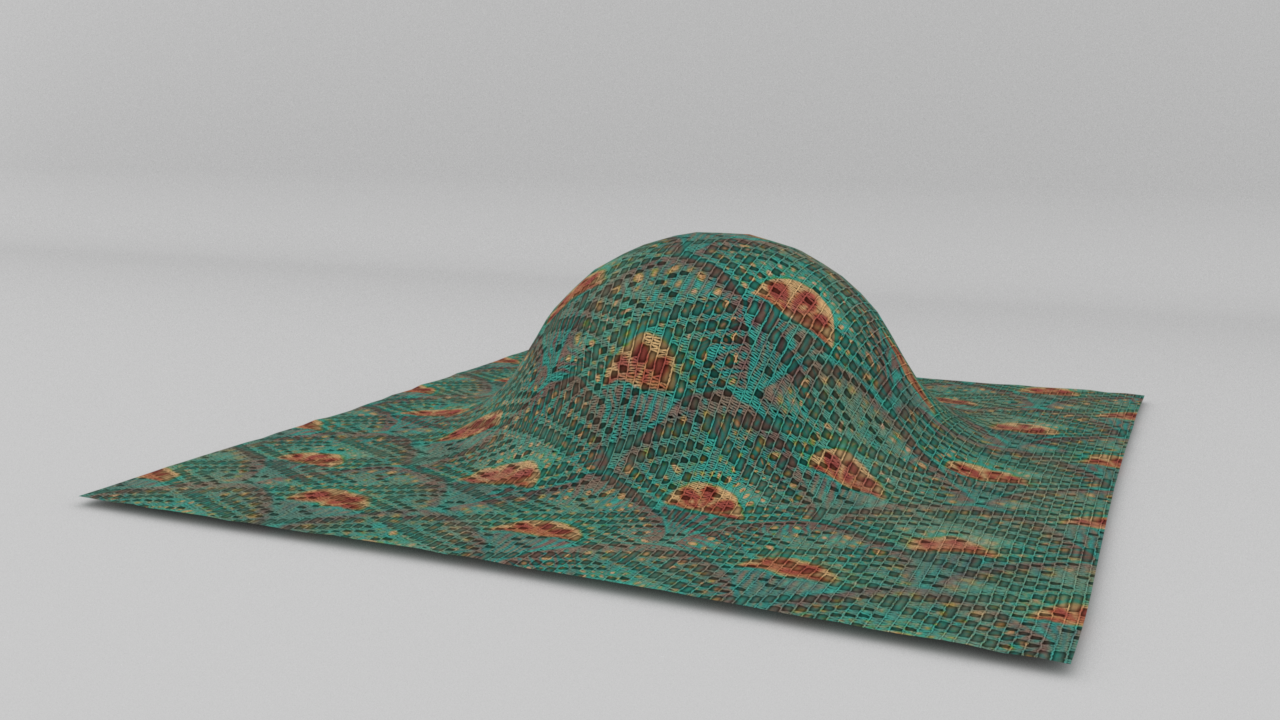
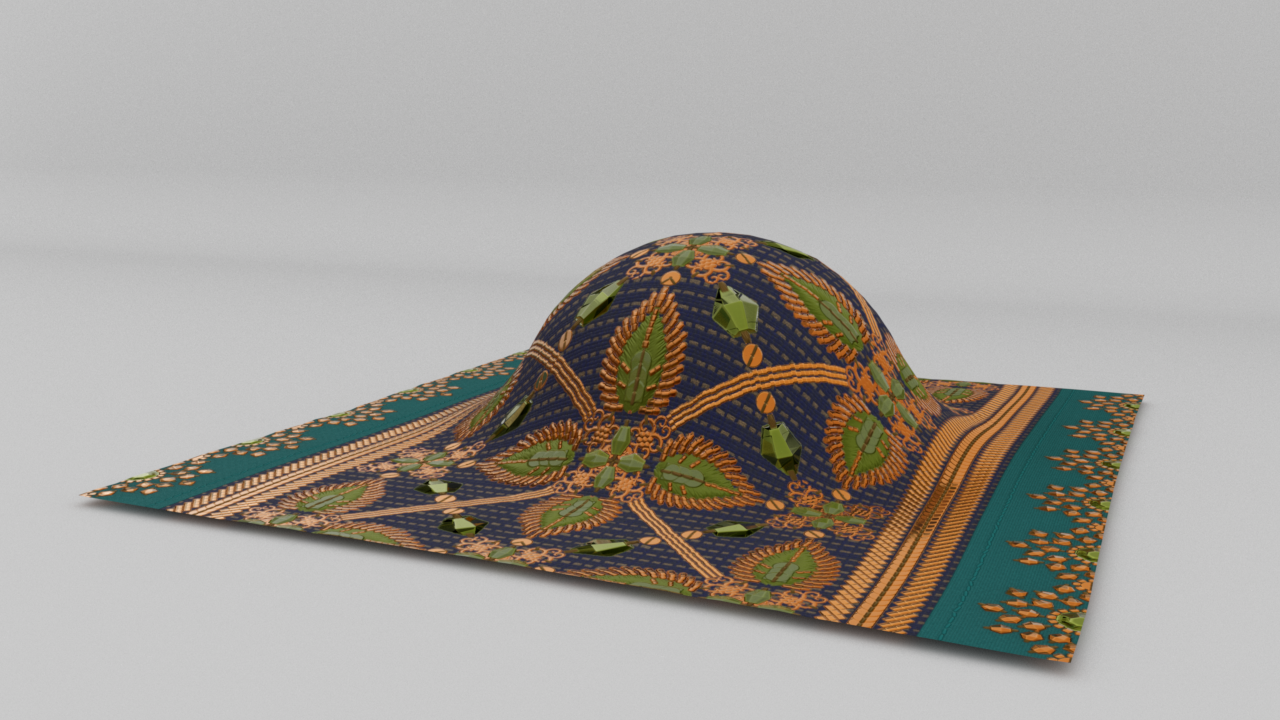
Clearly, two very different materials but excellent results in both cases. But now, look at the node trees for these materials:
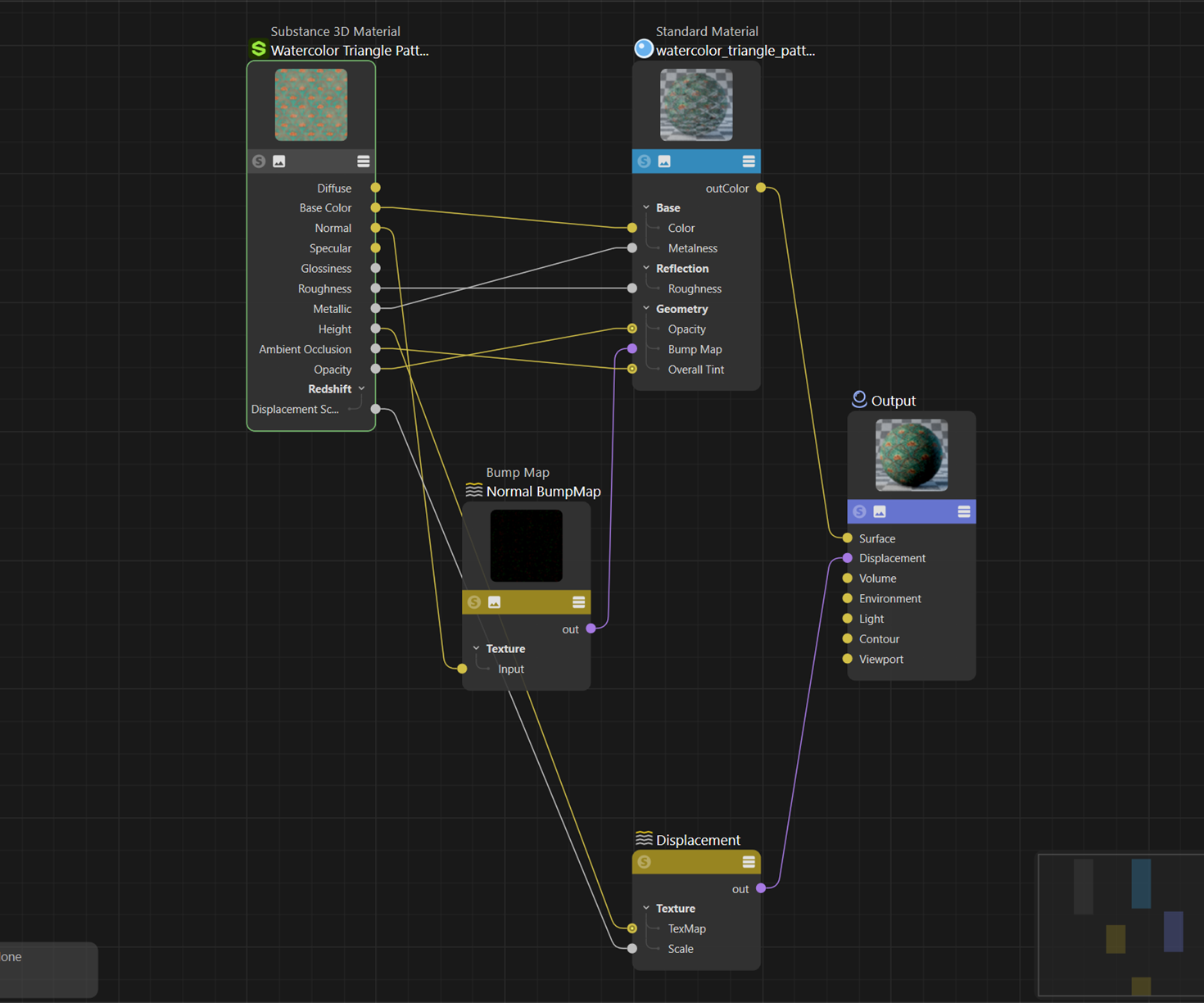
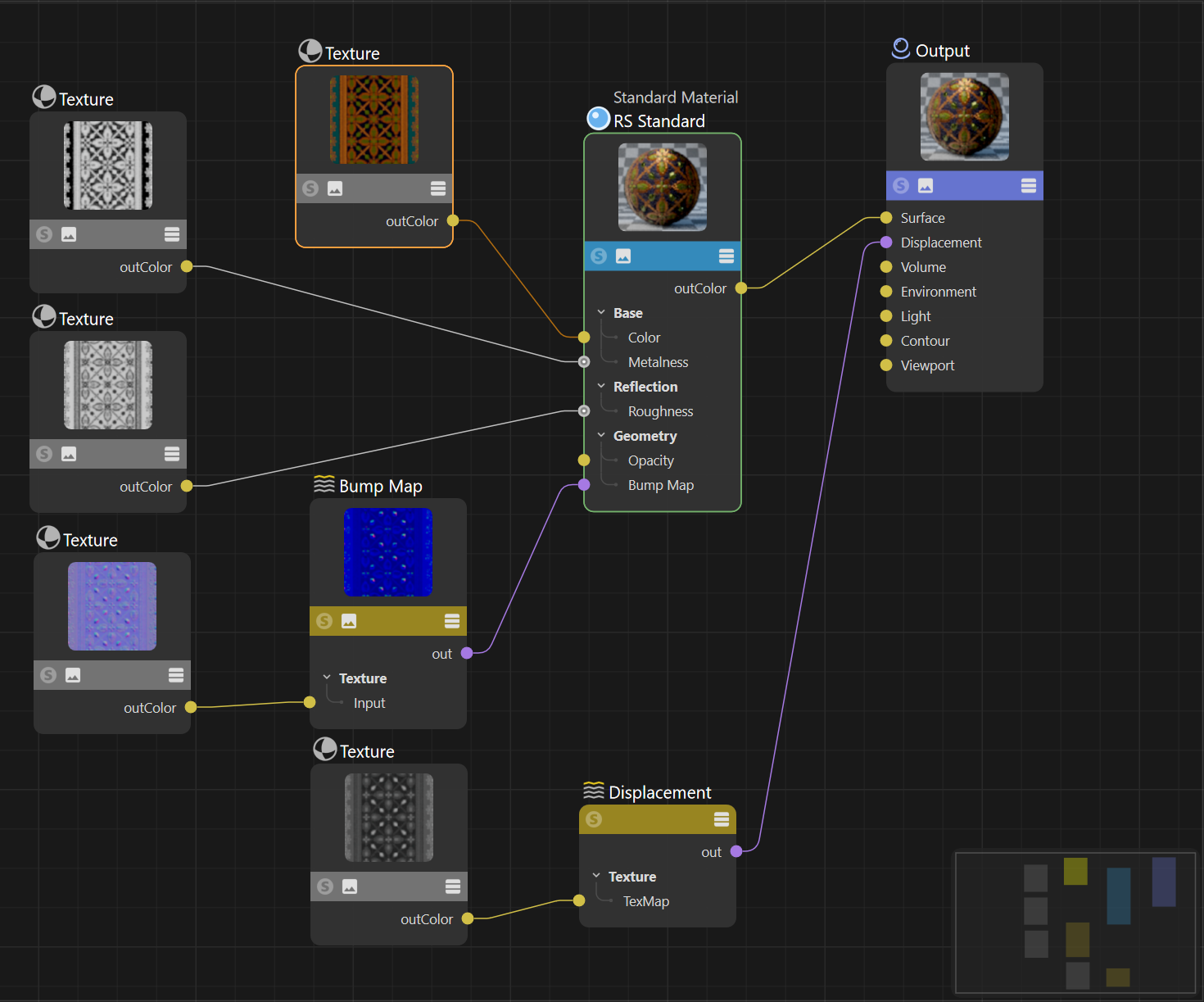
The Substance node tree has five nodes, created automatically for you on loading the Substance file, compared to Instamat's nine; also, all the Instamat bitmaps have to be loaded manually into the five texture nodes. But that's not the only advantage Substance has. If you select the Substance 3D Material node, the attributes look like this:
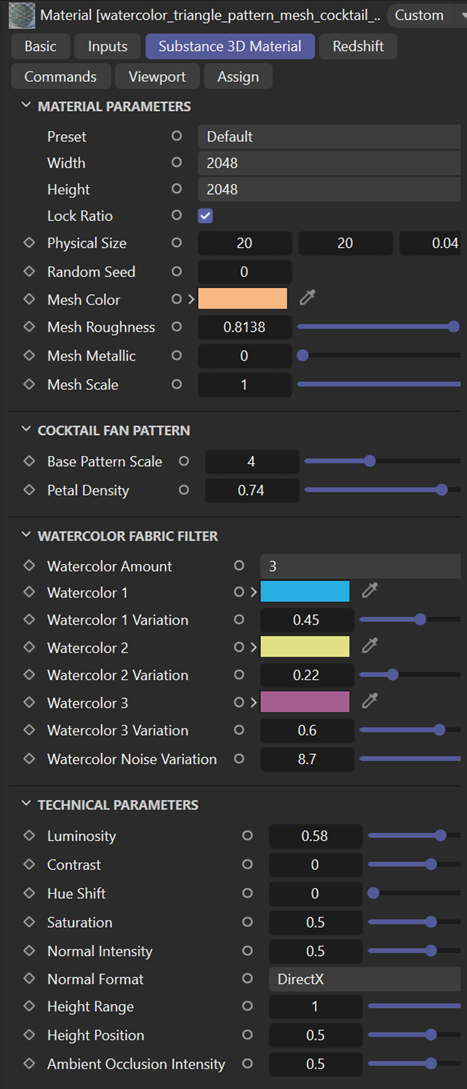
This material has been set by its creator to have four presets in a drop-down menu, plus you can alter various attributes such as resolution, colour, roughness, metallicity and so on without going back to the Substance app to do it. This is the great advantage of using a Substance package instead of bitmaps, but it isn't possible (yet?) in Cinema 4D with Instamat packages.
For some time I felt that Instamat was the way to go. It's similar to Substance in many ways and is free to use for individuals and companies with a low turnover, while Substance is expensive and is marketed by Adobe - which I'm trying to get away from. So it looks like a no-brainer, except...it isn't. Assuming that both apps (and I'm principally referring to Substance Designer here when comparing to Instamat) produce results of equal quality, what are the pros and cons of each? They can be summarised as follows (this is just my opinion, remember):
| Substance 3D | Instamat | |
| Material quality | Excellent | Excellent |
| Bitmap export | Yes | Yes |
| Use of native file format in other apps | Widespread | Limited |
| Industry standard | Yes | Not yet |
| Training materials | Very comprehensive | Good but not as large |
| Pre-built assets library | 20,000+ assets | 1,000+ assets |
| User community | Very large | Relatively small but growing |
| Pricing | Subscription model | Free or subscription model |
Some of these remarks need more explanation, and here I will use Cinema 4D as an example.
Substance 3D is very much the industry standard and all the main DCC apps can import and use the native file format (.sbsar) files. These are a single package which when imported into Cinema using the standard renderer will result in the creation of a new material with the relevant channels activated. In Redshift you create a Substance utility material and the node connections are all made for you. More than that however, in either render engine once the material is loaded it is possible to edit it and change some of the parameters in the Substance texture as shown in the image above. This is all done through a plugin which is now part of the standard Cinema 4D installation. Crucially, this does NOT require that the user of an .sbsar file must have Substance 3D installed on their machine.
Instamat is more limited. The range of apps which can load the native file format (.imp files) is smaller and doesn't include Cinema, which from my point of view is not good. But even those apps which can load .imp files and change the result, such as Maya or Blender, require that Instamat is installed and licenced on the same machine. This is extremely limiting and I can't believe that the makers of Instamat won't at some point produce a free, redistributable engine which can be used by anyone who downloads or is given an .imp file to use.
It's not surprising that Adobe, with its huge resources, produces more extensive training material and tutorials, and there is more third-party material too, given the larger community of Substance users. This is important because there is going to be a fairly steep learning curve with any of these apps, so the availability of tutorials, etc. is vital. Whether Instamat will ever match this is unknown; it depends on how successful it becomes, I suppose. At the time of writing, there were 127 videos in the Abstract 3D (the makers of Instamat) official YouTube channel; in the Adobe Substance 3D channel there were over 1,000. The same thing applies to any pre-built assets, there are simply more Substance assets available than for Instamat.
Ah, the price!
Pricing is where the two really diverge. Instamat has the great advantage of a free licence for individuals or companies with a low-ish turnover and then various subscription pricing models starting at $96 per year (as of March 2026). Substance 3D is not part of Adobe's Creative Cloud so has to be purchased separately and the current price is £200 UK pounds ($250 US dollars) per year, if paid annually. That's more than 2.5 times the cost of an Instamat indie licence. Many people don't like the Adobe subscription model, however, it is possible to purchase a standalone licence through Steam (yes ,Steam the game platform). Currently, Steam offers Substance Designer 2025* for £167 and Painter 2026 also for £167, which is £334 UK pounds in total and doesn't appear to include the Substance Sampler app which is part of the Adobe sub. If you only want Designer 2025, getting it from Steam will pay for itself inside a year compared to an Adobe sub, but you don't get any updates after March 2026, and you also don't get full access to the pre-built asset library. On the other hand, you aren't locked into Adobe's subscription pricing.
So what's the bottom line? If you like the idea of using the industry standard app, fuller integration with other DCC apps, the extensive tutorial and asset libraries, and can afford the price, you would choose Substance. But if you are attracted to the idea of being at the cutting edge of development and the use of the app being completely free (assuming you qualify for the Pioneer licence), plus being able to avoid Adobe, then Instamat is the one. In the end, it's your choice.
Epilogue
Which one did I choose? For your interest only - this is not a recommendation, just a personal choice - despite my desire to steer clear of Adobe, I went for Substance, primarily because both Cinema 4D and World Creator, the apps I use, can load .sbsar files directly, while neither can use Instamat's .imp files. If it doesn't work out for me, I can always cancel the sub next year and switch to Instamat, which - who knows - might be more accessible to users of Cinema and/or World Creator by then.
* Steam notes that Designer 2026 is 'Coming Soon'.
Page last updated March 24th 2026