

Creating a new plugin: 11

A confession
I took a short break from this plugin to think about where I was going with it. When I looked at it again, I first wanted to implement nucleotide chains and add a feature whereby the user could choose to display only amino acid chains, or only nucleotide chains (if any), or both. This caused a problem in that I was now maintaining two ways to create the bonds between atoms with several different modes - chain type, colour mode, which components to display and so on. This was too much to keep straight, and what began to happen was what every coder will experience at some point: adding a feature will affect another feature , which then needs correcting, which in turn affects the feature you just added..and so on. Or the code becomes entangled in a mess of conditional expressions (if..if else...if else...etc.).
To get round this, I reversed a decision I took earlier in part 10. This was originally to have two methods to create bond splines, one when colouring by bonds or by chains, and the other when colouring by residue. I had decided to keep both, but in the end I dropped the original bond creation method and now create bonds for each residue separately. Although this is less efficient, in that Cinema has to handle more objects in the scene, it simplifies the code considerably and any issue is only noticeable if the scene is animated. I think that's a fair trade-off in this case.
Nucleotides
So, to add nucleotide chains in addition to amino acids. It might be helpful to set the background for this first.
Some proteins can contain nucleic acid chains (such as RNA). So far, these are not being handled correctly by the plugin. Nucleic acid chains are contained in the same ATOM records as amino acids, but there are some key differences:
- The molecules making up the chain are nucleotides, not amino acids.
- The nucleotide names are different from amino acids (fairly obviously!).
- The atom names in the nucleotide are different, and the naming scheme is different, so there is no 'CA' atom, for example.
- Nucleotides are linked with a phosphodiester bond rather than a peptide bond.
The rest of the ATOM record can be dealt with in the same way as amino acids. The result of all this is that if a protein contains nucleotide chains, the atoms making up the nucleotide will be handled correctly and will display in the viewport, but the bonds between them will not be shown. We would see something like this:
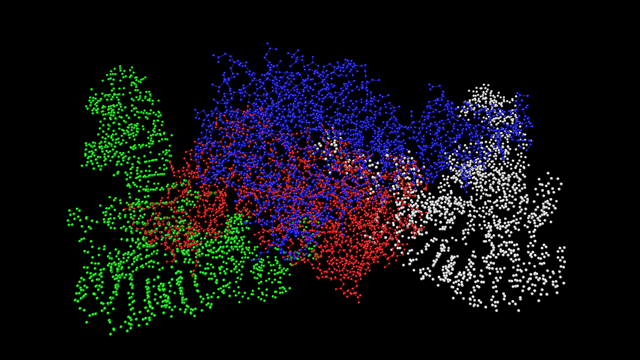
As you can see, this protein has four chains and two of them (red and blue) are amino acid chains, where the bonds are shown. The other two are nucleotide chains but although the atoms are shown, the bonds are not.
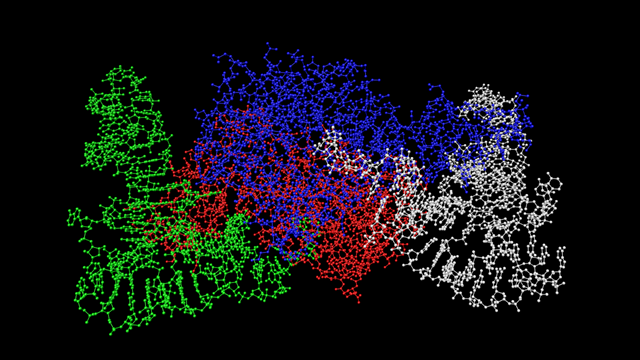
This is because the bond definitions don't yet appear in the bonds table used for bonds within amino acids, so those bonds have to be added to the table. There will be more bonds than for an amino acid because nucelotides are larger and more complex molecules, but there are only five of them rather than 22.
Once the table is updated with the list of bonds found in nucleotides, the same molecule shown above will now show this:
If only it was that simple
So far so good, but there are some outstanding issues. For RNA molecules, which are the ones we'd normally expect to see in conjunction with a protein, there are four nucleotides that could be seen in the chain. These are adenine, cytosine, guanine and uracil, which have the identifying letters A, C, G, and U respectively in the PDB file where the amino acid residue identifier ('HIS', 'LEU', etc.) is found. DNA isn't normally found with a protein in the same way, but it is possible that a PDB file might have DNA in with it, so we need to take that into account; the nucelotides in DNA are slightly different but use the same internal bond structure, and use the corresponding codes DA, DC, DG, and DT (because DNA contains thymine, not uracil). This doesn't actually cause a problem as long as the bond list contains the bonds for these molecules.
The atom naming system for nucleotides is different to that for amino acids. Each nucleotide has a base (the 'nucleobase') linked to a ribose molecule (this is a 5-atom ring) and the combination is then called a 'nucleoside'. Finally, the ribose molecule is linked to a phosphate group, the whole thing becoming a nucleotide. Only nucleotides can form chains to make up RNA or DNA, but nucleosides and/or nucleobases can be found as additional free-standing molecules in a PDB file. Fortunately these are given in HETATM records in the file, so we don't have to worry about them (yet!).
When it comes to bonds between nucleotides, it's not a peptide bond so checking for the 'N' and 'C' atoms which form such a bond won't work. Instead, it's a phosphodiester bond, which links an oxygen atom, named O3', of one nucleotide to a phosphorus atom in the next nucleotide. The principle remains the same: the first nucleotide in the chain won't have anything linked to its phosphorus atom and the last one in the chain won't have any link from its O3' atom.
Sorry about the biochemistry lesson but it's critical to understand how these molecules are formed and linked to interpret the PDB file correctly and produce a model.
So now we have nucleotide chains working correctly. At this point we can display any protein with chains of amino acids and nucleotides (if present). The next stage is to look at some some different display options. Instead of the ball-and-stick or wireframe modes (i.e. only showing bonds) what about if we showed each chain as a single spline - a 'backbone' approach? And are there other options we could implement? That's for next time.
Page last updated June 29th 2026