

Creating a new plugin: 14

And there's a problem...
There I was, getting to the point of adding final tweaks to the plugin when I found a problem. Take a look at this render (it's a model of a transferase protein that has featured in images in previous sections, file 4HG6 in the protein data bank):
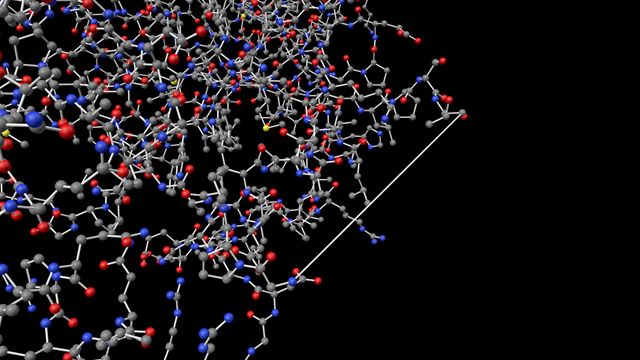
What is that long bond doing there? That's not a true covalent bond, they are much shorter than that as you can see from all the other bonds. So why has that appeared?
It turns out, as you may not be surprised to read, that this is a problem with the PDB file, not the plugin. For various reasons, sometimes the PDB file does not contain ATOM records for all the residues present in a chain. The residues are known to exist in the chain but they aren't present in the ATOM records in the file. In this case, 4HG6 is a protein with two chains, A and B, and in chain B there are some missing residues - from residue 532 to 543 inclusive. The long bond that we see is actually a peptide bond showing residue 531 linking directly to residue 544.
Clearly, this isn't right. How do we deal with it? The first thing to note is that many of these missing sequences occur at the beginning and/or end of a chain. In fact, 4HG6 has five missing sequences, one each at the beginning and end of both chains. The missing residues at the beginning and end we can do nothing about. Most (all?) visualisation apps just ignore them because there are no coordinates given until the first residue in the ATOM records of the file, even if that isn't the first residue in the chain. The ones that cause problems are the ones in the middle of a chain, as seen above.
The usual way to display these is to show a dotted line instead of a solid one. We can do that readily enough, but first there is a more fundamental question: how do we know if there are any missing residues in the file? Ideally, we'd read the ATOM records and look for a discontinuity in the residue sequence number. In the case of 4HG6, that would work. These are the relevant lines in the file:
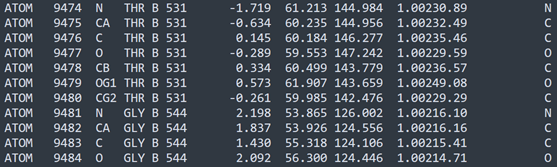
You can see that residue 531 ends, and where you'd expect 532 to begin, it jumps to 544. Unfortunately, we can't rely on the PDB file showing ATOM records in residue sequence order, so this won't work for all files.
REMARK records
There is another way to detect missing sequences. Every PDB file will contain many records that were, I suspect, originally intended for miscellaneous comments and information, but now may also contain essential data. The record header for such records is 'REMARK' and each REMARK may - this is optional - also have a remark number which specifies a certain type of data. For example, 'REMARK 1' contains details about scientific publications related to the protein/structure in the file. This isn't of use to us but REMARK 465 - if present - gives a list of all the missing residues which don't have coordinate data in the ATOM records. This is what we want.
Here is part of the REMARK 465 section from 4HG6:
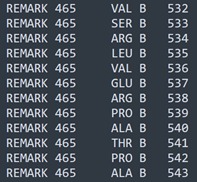
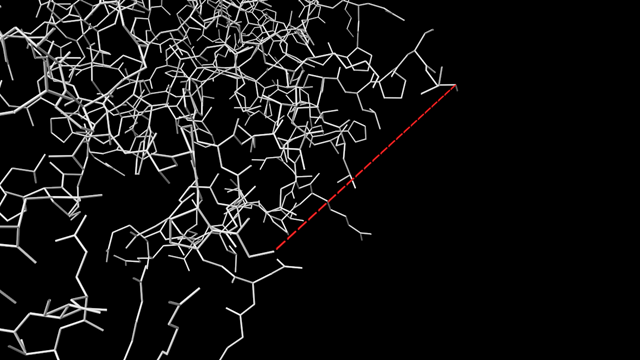
This tells us that there are missing residues in chain B from 532 to 543 inclusive. Which is exactly what we need to know. When reading the PDB file, we can extract the REMARK 465 lines and store them in a separate array - we only need the residue number and the chain identifier. Then, when constructing the peptide bonds between residues, we can still create the 'bond' between residue 531 and 544, but display it differently - in this case, I've chosen a series of dashes and coloured the spline red. The result looks like this (atoms hidden, only bonds shown for clarity):
 :
:
The red dashed line is a placeholder for the residues for which there are no coordinate data.
This all sounds as if it was really simple but it took a lot of thinking and experimenting to create an algorithm which would handle all cases of missing residues and either ignore them (the line can't be drawn if the missing residues are at the start or end of a chain because we have no way to know where the other end of the spline would be located) or draw the placeholder.
There might be other ways to display missing residues. I've seen several ways to do it: one app puts a star at the start and end of a missing sequence, and that does have the advantage that a single star at the beginning or end of a chain demonstrates missing residues there. Another app uses a wireframe 'basket' display to show the area where some missing residues might be located, and that also has advantages. For the moment I'm happy with the line display but maybe other modes could be added later.
That was a tricky feature to implement, and makes me wonder how many other quirks there are in PDB files which might come out of the woodwork. Which brings me on to...
CIF files
These are the current, modern equivalent of the legacy PDB file. They don't have the disadvantages seen with the older format, and are intended to be more machine-readable - which, of course, means less human-readable. I've come to the conclusion that I'm going to have to support the CIF file format, not least because all new structures added to the protein data bank are required to be in this format. I'm hopeful - very hopeful - that the data structures I've built up to hold the required data to display the structure in Cinema 4D will remain the same. The big difference is going to be parsing the new file format. But that is quite an enjoyable process and I've done it with a variety of file formats in other plugins. So this is next on the list.
Page last updated July 22nd 2026