

Creating a new plugin: 16

CIF files
The CIF file, or more fully the PDBx/mmCIF file (for Protein Data Bank Exchange Dictionary/macromolecular Crystallographic Information Framework) was introduced to replace the legacy PDB file when that became insufficient to represent very large and complex molecules.
The PDB file used a standard 80-column line for each record, apparently because it was based on old punch cards which had a fixed text width. Each piece of data in an ATOM record always occupied the same position in the record; for example, the atom serial number is found starting at column 7 and could occupy up to 5 characters. This meant that the maximum number of atoms stored in a PDB file was 99,999 - and many large molecules have a lot more than that. There were other limitations arising from the 80-column fixed format.
CIF files don't have these limitations because they don't use fixed-length records. The atom serial number in such a file can be as long as required, for example. All new submissions to the protein data bank are required to be in this format, although many also are provided in PDB format, too. These files contain all the informati0n present in a PDB file, but parsing the file is quite different because the structure is different. Apparently these files are supposed to be more machine-readable, but may be less easy to read by humans.
The core of a PDB or CIF file is always the atom coordinate section. In a PDB file, these are given in ATOM records and they look like this (these are the first three lines from 1GCN.pdb, which is glucagon):

In the corresponding CIF file for glucagon, 1GCN.cif, the same three lines look like this:

On the face of it, these look remarkably similar. And they are, even down to the tabular format which (I suspect) is simply to make the records more human-readable. However, there are two very significant differences. Recall that the PDB records use a fixed format, with each item of data in the same place and of the same length (padded with spaces if necessary). The CIF records don't use a fixed format at all; for one thing, the data items are space-delimited, so each item is separated by blank space or spaces. Missing or unknown data is usually replaced by a dot (.) or question mark, and you can see both in the above image. And there's more. The order in which these data items are given in each record is not fixed, so possibly in another file you might see the Z-coordinate followed by X and then Y (for example). They don't need to be in the same place either; another CIF file might start with the residue ID and follow that with the coordinates. And finally, not all those data items may be included and some others might be added to or inserted somewhere in the record. Of course, the ATOM records in a CIF file must always have the same data items in the same order, it isn't possible to omit some or add others within the the same file.
Looping the loop
Okay...so how do we know which data items are present and in which order? Immediately before the block of ATOM records, there are several lines beginning with the keyword 'loop_'. This indicates that a block of data is about to follow, and the format is specified in the lines after the keyword. In fact, there are usually multiple 'loop_' sections in a CIF file, each followed by a block of data. Here is the loop_ section for the ATOM records, plus the first three such records:
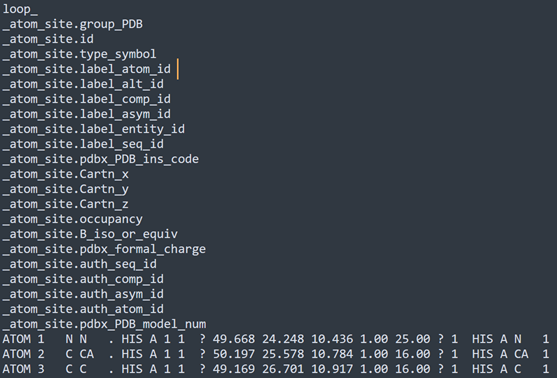
The lines beginning with an underscore give the name of a data item, and in each record the data items are separated by spaces, each item occurring in the order of the names in the list. For example, the name '_atom.site.Cartn_x' is the 11th line after 'loop_', so the data item (the X-coordinate of the atom position) is the 11th item in the record. Now, you can see in the ATOM lines that this data is indeed the 11th item in the record but in other files it might not be. But that doesn't matter; as long as we know which line corresponds to which item of data, we can find it wherever it is in the ATOM record.
Yes, but...
There's a (potential) problem here. The data item '_atom_site.group_PDB' is not a required item in a CIF file, so it might not be present in all files. According to the format documentation, this item "...is provided for compatibility with the original Protein Data Bank format, and only for that purpose." Which means that in future it might disappear. I suspect that the reason it is there is because current visualisation apps look specifically for records beginning with ATOM or HETATM (as indeed this plugin does!), and to stop using this data item would require a rewrite of the file parsing code. Given that, it would be sensible not to rely on this data item but it is still the quickest and simplest way to determine if an atom is part of an amino acid or nucleotide chain versus a heterogen atom. For that reason, the plugin will use this data item with a fallback to test '_atom_site.label_comp_id' which is a required field and which identifies the residue. This can be tested against a list of standard residue IDs, though this only works if the list is comprehensive and accurate.
Firstly therefore, we need to decide which data items we want. For the purpose of this plugin, we need the following subset:
| Data item name | Position in the loop_ section | Meaning |
| _atom_site.group_PDB | 1 | Denotes either ATOM or HETATM |
| _atom_site.id | 2 | Atom serial number |
| _atom_site.type_symbol | 3 | Atomic symbol, e.g. 'C', 'O', 'N', etc. |
| _atom_site.label_atom_id | 4 | Atom name, e.g. 'CA', 'CD2', etc. |
| _atom_site.label_comp_id | 6 | Residue name, e.g. 'HIS', 'SER', etc. |
| _atom_site.label_asym_id | 7 | Chain ID, e.g. 'A', 'B', etc. |
| _atom_site.label_seq_id | 9 | Residue sequence number |
| _atom_site.Cartn_x | 11 | Position X-coordinate |
| _atom_site.Cartn_y | 12 | Position Y-coordinate |
| _atom_site.Cartn_z | 13 | Position Z-coordinate |
Remember that the order of data items shown above is only specific to this file and might vary in other files. Before reading the ATOM records therefore, we need to parse these lines and determine which position in the record each data item will have, since it could vary between CIF files. Having done that, we can load each of the record lines in turn (each line being an ATOM or HETATM record, just as in legacy PDB files) and split them into the individual data items. Fortunately, there is a Split() function in the Cinema SDK, so perhaps we can use that with a space character as the delimiter to split the record into individual strings, which the function stores in a BaseArray of strings.
Unfortunately, that doesn't work here. It's not a problem with the Split() function, it's a problem with the record string. If you look closely, you can see that some data items are separated by one space, some by two spaces, and some even by three. This is to make them line up vertically giving a nice tabular format. However, when the Split() function encounters a double space, the first is treated as the delimiter but the second is assumed to be a valid but empty string. The result is that the array contains all the data items but interspersed with empty strings, so the possibility of using the position of the data item name in the list as an index into the array is rendered useless.
I thought about several solutions to this; we could use the Replace() functi0n to replace all double or triple spaces with single spaces and then parse the record, so the Split() function would work correctly. Or, we might split the raw string, accepting the empty data items, then delete all entries from the array which were empty strings. Neither method really appealed, partly because they would be slow and partly because I could never quite be sure it would work with all possible records. In the end I wrote my own split function, which at least means I would know exactly what it was doing if a problem occurred.
Finally, after splitting the record string and storing the parts in an array, the required data can be extracted by using the position of the data item in the list of names as an index into that array, which is very fast. Having done all that, the result (for glucagon anyway, which I'm using as an initial test molecule) is identical to that from the PDB file. Which is a great relief - if it was different I'd be wondering if that was a genuine difference between two files or if I'd done something wrong. As it is, I strongly suspect that the CIF file was created by conversion from the original PDB file - if it hadn't been, the atom positions would be different at least.
Is that it?
No, we haven't finished yet. The ATOM records are read and the data structures and array of ATOM records filled. But there is other data we need. There are disulphide bonds, for example, or metadata about the file which would be useful to display. Getting this information is going to be different from a PDB file, so that's the next stage.
Page last updated August 2nd 2026