

Reading a text file

Reading a text file line-by-line
This is one of those things which can be surprisingly tricky to code. The Cinema SDK contains a lot of functions to open and read files. The problem is, they are mostly intended to open .c4d files created by Cinema itself. A problem arises if you want to read a plain, ASCII text file. I had to do a lot of this while developing my PDBLoader plugin (see the numerous previous entries in this blog!). The issue was this: the files I wanted to load are all ASCII text files but I wanted to be able read them one line at a time. At first sight, this seemed so elementary.
The first problem
There must be an SDK function to do this, surely? After all, the C++ standard library can easily do it, and the Maxon file functions must be based on that.The first place to look is the BaseFile object. That has many functions for file manipulation, and there is a ReadString() function. This looks ideal, but if you try it on a plain text file, it fails. This is because it's intended to read String objects from a .c4d file which has had String objects written to it, and these contain some header bytes which don't exist in a plain text file. There are other functions such as ReadBytes() but this assumes you know how many bytes to read, which is not useful for variable-length lines in a text file.
What this means is that there is no equivalent to the C++ standard library's 'getline()' function. And you have to ask: why? It's such an obvious thing to include, but it hasn't been. It's true, you can read a whole text file into an array using functions the InputStreamInterface makes available, but that's the point: it reads the entire file, not one line. So, how to carry out this simple action in a C4D plugin?
The easy way
This would be simply to use the C++ standard library. However, Maxon recommend against doing this. The reason - as I understand it - is that the library functions can throw exceptions, which the SDK can't handle correctly. If so, this is a problem, because file I/O operations could well throw an exception, which might (would?) cause the plugin to crash. Therefore, it would be better to use the SDK equivalent function - which doesn't exist. And that means we'll have to write our own.
Using BaseFile to create a 'getline()' equivalent
There is one BaseFile function which could be of use. This is 'ReadChar()', which reads a single character from the file. We could use this to read characters from the file until the end of the line is reached. But...how do we know if that's the case? What is the 'end of line' in a text file?
The 'end-of-line' problem
If you look at a text file in a text editor, it's obvious where a line ends (well, it is if the word wrap setting has been turned off). It's simply where the line ends and a new line starts. So how does a text editor displaying a file 'know' when to start a new line?
The answer is that it encounters an end-of-line character. This all stems from old teleprinter commands before email, when text sent to the printer had to tell the printer when to start a new line. For this purpose, two control characters were added to the end of each line. One was a carriage return ('CR') which is ASCII character 12, and the other was a line feed ('LF') which is ASCII character 10. The first told the printer to return the print head to the start and the second told it to advance the printer paper by one line.
This worked well, and when text was stored on disk the same convention was adopted. Each line in each file was terminated by these two characters and Windows today follows that standard. If everybody had followed this protocol life for anyone coding the reading of a text file would be a little easier. Unfortunately, two other protocols were also used. The original OS for Apple Macs used a single carriage return character, while UNIX used a single line feed character. (Note that macOS nowadays is based on UNIX so uses the same convention - a single line feed acts as the end-of-line marker.) Regardless, all of these characters or combinations can be considered simply as a 'newline' character, or perhaps 'marker' would be more accurate.
So, our GetLIne() function must take all three possibilities into account, and that leads to a problem. When the line is read, if the character is a line feed, then this must be a UNIX-style file and that's the end of the line. But if it's a carriage return, it can either be a Windows file or one created on an early Apple Mac. The only way to find out is to read the next character; if that's a line feed, as it will be in the vast majority of cases, all is well and that's the end of the line. But if it isn't, then we've now read the first character in the next line. That means we need to move the file pointer back by one character, or we'll lose the start of the next line. We can easily do this using the BaseFile::Seek() function, so we are now able to handle all three newline cases.
The 'end-of-file' problem
We can keep on reading lines but eventually we're going to reach the end of the file. How do we know when that happens? There is no end of file marker as for end of line. By definition, the end of the file is reached when no more data can be read, and when that happens, BaseFile::ReadChar( ) will return false. Take a look at this simple text file, which has three lines terminated with CR/LF newline markers:
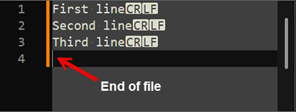
There's an interesting point here. Any human would say that there are three lines. But the text editor (it's Notepad++ but all editors do the same) implies that the empty line which is the end of the file is a fourth line. This is clearly not the case, so a line where we hit end-of-file is not a line and our function should return false to show that's the end of the file. However...take a look at this:
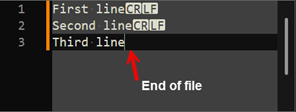
Here, the user has hit backspace and deleted the newline marker at the end of the line. Now, by definition (see the IEEE POSIX standards) a line is a sequence of zero or more non-newline characters terminated by a newline. Therefore, the third line above is not officially a line! In fact, you could have a very large text file and if it had no newlines in it, it would be considered to have no lines. More practically, this line is considered to be an 'incomplete' line. In this case, if we simply returned false from our GetLine() function because we are at the end of the file, the calling function would ignore that last line. I don't think many users would welcome our function losing the last line of a file because the writer forgot to hit Return before saving it.
Anyway, what this means is that we can't simply return 'false' if we reach end-of-file. What we can do is check to see if any characters have been read up to that point, and if so, return 'true' even though end-of-file has been reached. The calling function will then call GetLine() again, but this time there won't be any more characters and the function will return false correctly.
Incidentally, there is a comprehensive discussion about end-of-line characters at the site loginradius if you want to know everything there is to know about this.
The result
With all that done, our GetLine() function should now work correctly regardless of newline markers and incomplete lines. After I had written the code, I discovered that there is a ReadLine() function coded in the SDK example file morphmixer.cpp. I was quite gratified to see that my code was so very similar to Maxon's! But there are some differences. The first is that the Maxon function only looks for the CR/LF combination if the plugin is running on Windows. But that means it assumes the file being read was created on Windows. If the plugin is running on a Mac and loads a Windows file, the resulting string will have an extraneous carriage return at the end. Presumably this doesn't cause problems in this particular context.
The other interesting difference is that both my and Maxon's function store the read characters in a Char array, then use the String::SetCString() function to convert this into a C4D String object. SetCString() can be used in two ways. The first is to pass the number of characters in the Char array, which is what the Maxon function does. The other is to pass the value -1 instead of the number of characters, which means use all the characters in the array until a null terminator is found. I prefer that way, being an old-school C programmer, but it does mean that I have to add the null terminator when the end-of-line is reached.
So, here is the finished code. It's fully commented so it should be clear how it works:
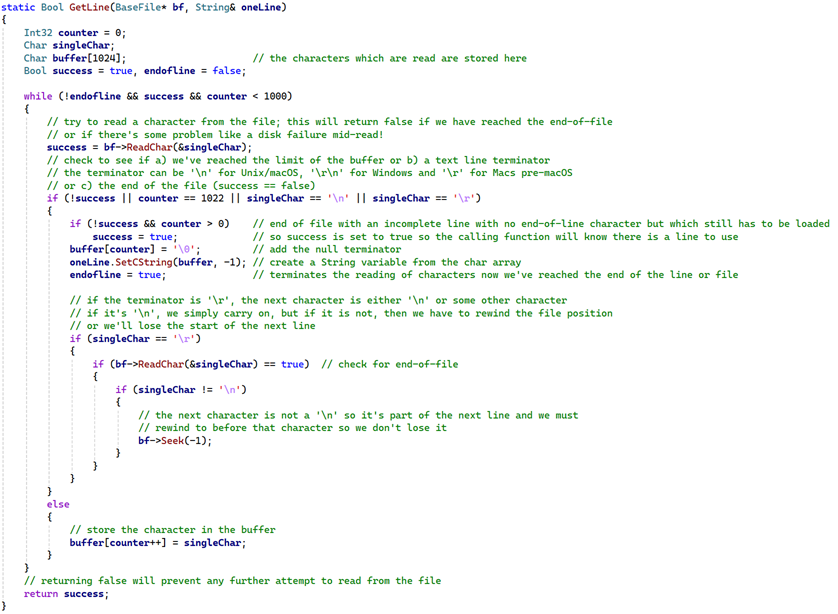
You can download the code in a .zip file here.
I hope this was of interest. What seemed like a simple issue turned out to be more complex than first supposed, and some of the concepts mentioned go right back to the earliest days of computing.
Page last updated August 18th 2026