

Scatter vs. Scatter

Scattering objects
Cinema 4D 2027 has a new Scatter object designed to scatter objects over the surface of another - e.g. plants on a landscape. I was intrigued to see this because X-Particles, which I helped develop for around 10 years, also has a scattering object, and I wrote the initial version of that (though it has been updated since). So I was particularly interested to see how the two scatter systems compare, and which, if any, is the better of the two.
The first thing to note is that they are remarkably similar. Some might feel that Maxon Scatter is a near copy of XP Scatter; on that, I couldn't possibly comment. Of note, both are based on existing technology - XP Scatter on the X-Particles particle system and Maxon Scatter on Mograph. So, how do they stack up against each other?
Distribution of objects
This is the core of any scattering system. Both need an object to scatter other objects on, which I will call the 'base object'. XP Scatter scores here because it can scatter on multiple base objects at once, whereas Maxon Scatter can only scatter on one at a time. Having said that, you can use a Connect object and make multiple base objects children of that, then use the Connect object as the single base object, and it works. It's a bit less convenient though.
Both can control the number of scattered objects. XP Scatter has a useful option which assigns exactly one of the objects being scattered to each polygon or vertex if either of those distribution modes is selected. Both also allow you to use a selection tag to specify where to scatter them, though Maxon Scatter only lets you use a polygon selection; in XP Scatter you can use point, polygon, or edge selections and vertex maps. Maxon Scatter does have separate options to use vertex maps for both distribution and density of scattered objects. Where XP Scatter really excels, however, is in allowing you to control the scatter distribution with the surface texture, which Maxon Scatter does not do. There's an interesting quirk here which is worth pointing out. Suppose you have a texture you want to use to control the distribution, but you want another texture to be the one which is visible on the base object. What you need to do is add both textures to the base object. The first one (that is, the leftmost texture tag on the object) is used to control the distribution. The second and any subsequent textures are those displayed on the base object.
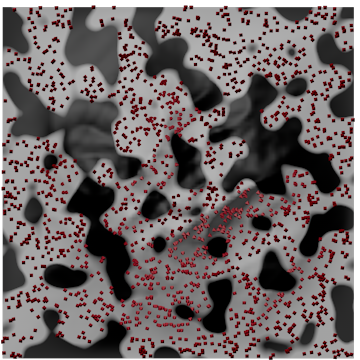
Figure 1. XP Scatter - distribution controlled by a Noise texture
Both scatter objects have several distribution modes to determine how other objects are scattered. For comparison, they are listed in the table:
| Maxon Scatter | XP Scatter |
|---|---|
| Surface Grid | Polygons |
| Spline Projection | Surface Area* |
| Area Weighted* | Surface Texture |
| UV Grid | Surface Illumination |
| Polygon Center | |
| Vertices | |
| Edges | |
| Object Volume |
* these modes are functionally equivalent across the two objects.
The default for Maxon Scatter is 'Surface Grid' which is rather an odd setting in that it only scatters objects over one orthogonal plane. This is fine for some base objects, such as a Plane, but in many cases a better choice is 'Area Weighted'. XP Scatter definitely is more functional here due to useful modes such as texture, illumination and object volume. However, it lacks the very nice 'spline projection' mode of Maxon Scatter.
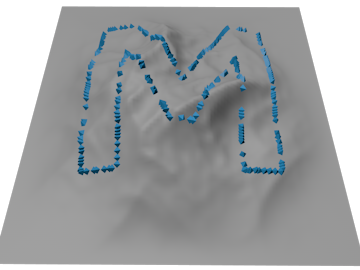
Figure 2. Maxon Scatter - spline projection distribution using a text spline
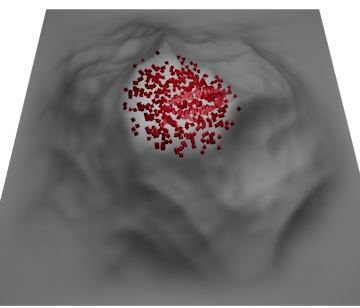
Figure 3. XP Scatter - distribution controlled by illumination of the surface from a spot light
What happens if you are scattering more than one object on the base object? What proportion of each object do you see? In both systems this is a random distribution of different objects by default, so for two scattered objects you'd expect to see about half the objects being one and half the other. In XP Scatter you can vary the ratio with a gradient in the scatter object itself, which is quick and convenient. Maxon Scatter can't do this but you can use a Shader effector with a gradient to achieve much the same result. It's just less user-friendly to set up.
Finally, both objects can handle base objects which are deformed, though you have to turn this on in Maxon Scatter; in XP Scatter it happens automatically.
Separating scattered objects
Both scatterers (is there such a word?) let you prevent objects from getting too close and maybe overlapping one another. They do this either by removing overlapping objects or by pushing them apart (XP Scatter calls this 'kill' and 'push'; Maxon Scatter calls it 'remove overlapping' and 'relax'). Maxon Scatter has an advantage in that you can use relax and remove overlapping at the same time, whereas in XP Scatter it is either/or.
Alignment
This is an important feature of any scatter system, the ability to align scattered objects as required. Both systems let you align the objects along one of the orthogonal axes, and both can align them along the surface normal, which is the most common (and useful?) setting. Maxon Scatter lets you blend normal alignment with alignment along an orthogonal axis, which XP Scatter cannot do. XP Scatter does have one really useful (almost essential) feature that Maxon Scatter lacks: it can position the scattered objects so that the base of the object sits on the surface, whereas Maxon Scatter sits the object's axis centre on the surface, which can make the scattered objects look half-buried. This can be remedied by using an offset along the relevant axis (see below) but that works best when the objects are all the same. With different sized objects whose axis centres are at different positions it doesn't work so well, but the align to base function in XP Scatter handles this without problems.
Maxon Scatter has a useful 'look at' setting which makes the scattered objects look at the camera or another object. XP Scatter doesn't have that, but it does have a 'field of view' setting which means that objects will only be scattered if they would then be in the field of view of a user-specified camera.
On the same topic, it's useful to be able to control scattering by parameters such as height. Maxon Scatter calls this 'Filter' and XP Scatter, 'Topology'. 'Height' (or 'Altitude') lets you scatter objects if they are above or below a certain height on the base object. Think trees below the snow line on a mountain, for example. Both systems can use height, slope and curvature as controls, though the implementation differs considerably. With curvature, it's my impression that Maxon Scatter is easier to use and control, and is certainly faster. Maxon Scatter also has a useful feature to confine scattered objects to the boundary of the base object.
Transforming the scattered objects
There are certain things we might wish to change in the scattered objects, namely the classic triad of position, scale and rotation. Both systems allow this, but the Maxon Scatter controls (in the 'Variations' tab) are more comprehensive than XP Scatter ('Transform' tab). Both systems also allow the colour of the scattered objects to be varied.
Other features
Maxon Scatter has two additional tabs. One is 'Cluster' which distributes the scattered objects into a number of clusters. This is useful and works well. XP Scatter can't do this but you can achieve the same effect by using texture-controlled distribution with a noise texture, and it will give you pretty much the same level of control.
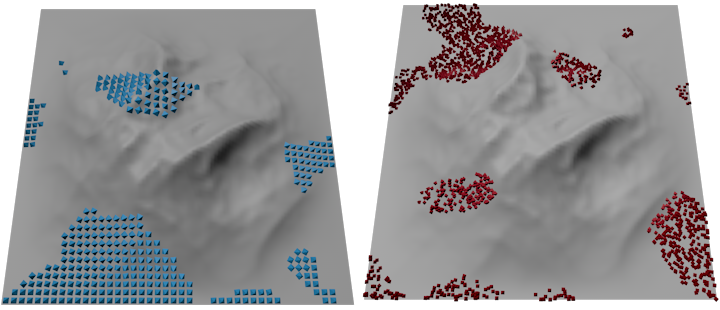
Figure 4. Examples of 'clustering'. Maxon Scatter on the left using the 'cluster' feature; XP Scatter on the right using a Noise textre
The other tab is 'Proximity' which means that objects will not be scattered (or, if inverted, will only be scattered) within the volume of another object. This works very well and could easily be added to XP Scatter. As with cluster, it can be reproduced in XP Scatter, this time by using a Kill modifier in 'objects' mode, but again, it is less convenient.
Effectors, Modifiers and Fields
Being Mograph-based, Maxon Scatter can use Mograph effectors which in turn can use fields. This can enable a wide range of other changes to the scattered objects - e.g. scale could be randomly changed with a Random effector. XP Scatter doesn't use effectors but it can use X-Particles modifiers, though not all work - those affecting speed or movement won't do anything, for example, and nor will those modifiers which generate something else as they need an emitter to work. But others will work; for example, the xpAttractor modifier neatly emulates the 'look at' function in Maxon Scatter. And there are a lot of modifiers in X-Particles!
With regard to fields, in Maxon Scatter these are only of use when used with an effector. But in XP Scatter, fields can be used directly in the scattering object, as well as in any modifiers if desired. This is really useful because with fields you have even more control over scattering distribution.
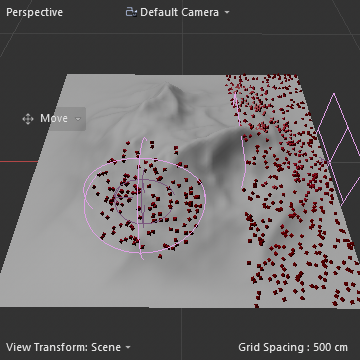
Figure 5. XP Scatter using two Field objects (Spherical and Linear) directly on the object to control distribution
Conclusions
That's pretty much it. This article isn't intended to be a review of either system but a comparison of the two, in case you find yourself in need of a scattering system. I think my findings can be summarised very simply as follows:
- both are very capable scattering systems
- XP Scatter offers significantly more options when distributing the scattered objects, especially texture-controlled distribution
- Maxon Scatter has additional features that XP Scatter doesn't have out of the box
- XP Scatter is part of a commercial plugin while Maxon Scatter is included in the latest Cinema 4D version
And the winner is...
Neither. Both are good systems. If you already have X-Particles then I would use XP Scatter for its better distribution functions (I acknowledge that I may be biased here!). If you don't have XP, and you don't need the XP particle system, then you probably won't want to buy X-Particles just for scattering. Unless, of course, you are using C4D R2026 or earlier, which don't have the Scatter object. In that case, it's a no-brainer.
Page last updated October 26th 2026